Enemy Mine
Enemy Mine
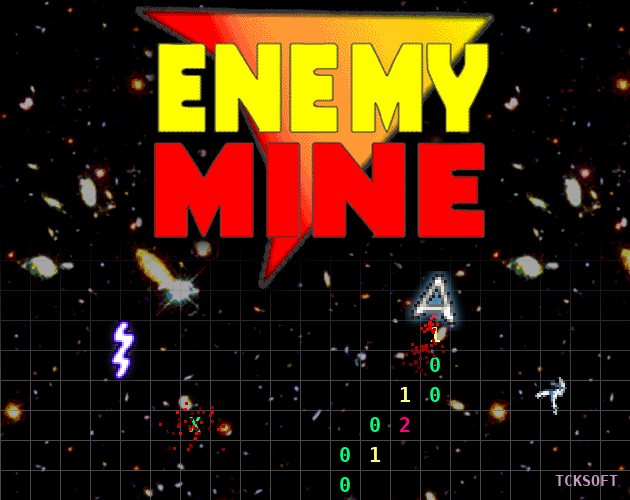
Thrust meets Minesweeper. Pilot your ship through a hidden minefield, using nothing but the numbers you leave behind.
About the game
Enemy Mine started as my entry for a 150 Lines Game Competition in January 2003, written in Blitz Basic. The challenge was to make a complete game in no more than 150 lines of code. It came in at 119.
For this 2026 release I’ve gone back to the original code. I tidied it into readable, commented source and fixed the bugs that had sat there for over twenty years. The most notable one: the “You Have Won” screen could never actually appear, so anyone who cleared all 25 sectors in 2003 was told GAME OVER instead. The lives and adjacent-mines displays now work properly too, and the laser’s hitbox finally matches what you see on screen.
How to play
Fly your ship from the safe zone at the bottom of the screen to the safe zone at the top. The mines are invisible, but every square you fly over reveals how many mines are touching it:
- Green 0: no mines next to this square
- Yellow 1: one mine next to it
- Red 2+: two or more, so tread carefully
Only the squares directly above, below, left and right count; diagonals don’t. Hit a mine and you lose a life.
There are 25 sectors, and each one has more mines than the last. Even sectors add a crackling electric laser that falls down the screen. Every third sector has two stranded spacemen to pick up for 5,000 points each. A time bonus counts down in every sector and is added to your score when you reach the top, so it pays to be quick as well as careful.
Your ship has inertia and gravity, so use thrust carefully.
Controls
| Key | Action |
|---|---|
| ← → | Rotate ship |
| Space (or ↑) | Thrust / start game |
| Esc | Return to the title screen |
Click the game window first to give it focus and switch the sound on.
Bonus: ZX Spectrum demake (Claude AI)
The download section also has a ZX Spectrum 48K version, written from scratch in Z80 assembler. It has a loading screen, colour-coded mine counts, flicker-free sprites, beeper sound effects and Kempston joystick support. It comes as a .tap tape image that runs in any Spectrum emulator, or on real hardware through a tape-loading device.
Spectrum controls: Z/O rotate left, X/P rotate right, Space/M thrust, Q quit. Press K on the title screen to turn the Kempston joystick on or off.
© 2003–2026 Andrew Pointon (TCK) – TCKSoft
Download
Click download now to get access to the following files:
Leave a comment
Log in with itch.io to leave a comment.